Architectural engineering and construction science construction classroom (2016 Seaton Hall) instructions
Download PDF copy of instructions.
Technical Support
Engineering Computing Services
785-532-4643
support@engg.ksu.edu
To rise and lower the projector screen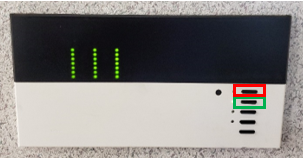
- Locate the room control panel on the wall just to the right of the classroom door.
- To lower the screen and dim front room lights, press the second button on the right side of the panel.
- To raise the screen, and turn front room lights back on, press the first button on the right side of the panel.
To turn the projector on
- Locate the projector remote control on the presentation desk and press the Power button.
At the start up, the projector may display a warm-up countdown screen for 20-30 seconds, and then start cycling through to display your device.
To turn the projector off
- Locate the projector remote control on the presentation desk and press the Power button.
- Power Off? will be displayed on the screen. Press the Power button again to turn the projector off.
- WARNING: Security software on this computer will erase all changes made on the next reboot. This includes any files or data you may have created. These lost files are non-recoverable. To use a network drive for your data, please use the ENGG Login shortcut located on the desktop of the computer.
To use the laptop
- Attach the HDMI or VGA cable to your laptop.
- The switcher will automatically switch to the laptop if detects a laptop connected.
- Audio will only work through the presentation computer.
