Grid
Webform Grids allows you to show a "Matrix-like" display to the user.

Example of a webform grid display
Options
Options show themself at the top of the grid on each column. Each question must have a machine-readable title followed by a pipe '|' and then the option text you would like the user to see. For the example grid below, this is how the 'Options' field would be filled in:

Questions
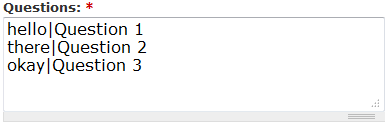
Questions will be shown to the left of the grid on each row. Like options, they must be setup first with a machine readable title followed by a pipe '|' and then the question to be shown to the user. For the example grid below, this is how the 'Questions' field would be filled in:
| File | Up | Select |