Select
Select options allow you to add a drop down list to your webform.
Options
Options need to be entered in a strict format. They need to be first written in a machine-readable format, followed by a pipe '|' and then the option in a user friendly way. Below is an example of how this could be done.

Multiple selection
If you would like the user to be able to select multiple options at the same time, click the Multiple checkbox.
Display
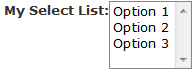
You have multiple ways to display your select list. It can be in a radio/checkbox list format, in a more traditional drop-down list or a listbox. Below you will see examples of the different ways this looks.
 |
 |
| Show the options inline and with checkboxes or radio buttons. This is the default format. |
Drop-down format |
| Grid | Up |